
What I Learned Building a Multimodal RAG From Scratch
Introduction
Over the past few weeks, I built a multimodal Retrieval-Augmented Generation (RAG) system for a due diligence application that analyzes company documents such as annual reports, financial statements, and investor presentations.
Before adding visual understanding, I had already built a fairly mature text retrieval pipeline. The pipeline extracted structured text directly from PDFs, performed hierarchical chunking to preserve document context, indexed the chunks in Qdrant, and combined semantic vector search with BM25 using hybrid retrieval. For text-heavy questions, the system consistently returned relevant context and produced reliable answers.
The limitations only became apparent when the documents relied on visual information.
Annual reports and investor presentations are filled with financial tables, bar charts, pie charts, organizational diagrams, process flows, and complex page layouts. While these pages often contain text, simply retrieving the extracted text isn't always enough to understand the information being presented. The meaning frequently depends on the visual structure of the page.
This article isn't another "How to Build a Multimodal RAG" tutorial. Instead, it's a walkthrough of the engineering decisions, implementation challenges, architectural trade-offs, and lessons I learned while extending an already capable text RAG system into a multimodal one.
When My Text RAG Reached Its Limits
My text RAG pipeline was already performing well. With hierarchical chunking and hybrid retrieval, it could accurately answer questions such as "Who is the CEO?" or "What are the company's plans for the next quarter?" because the required information existed as text in the document.
The problem started when the answers depended on charts, graphs, or tables.
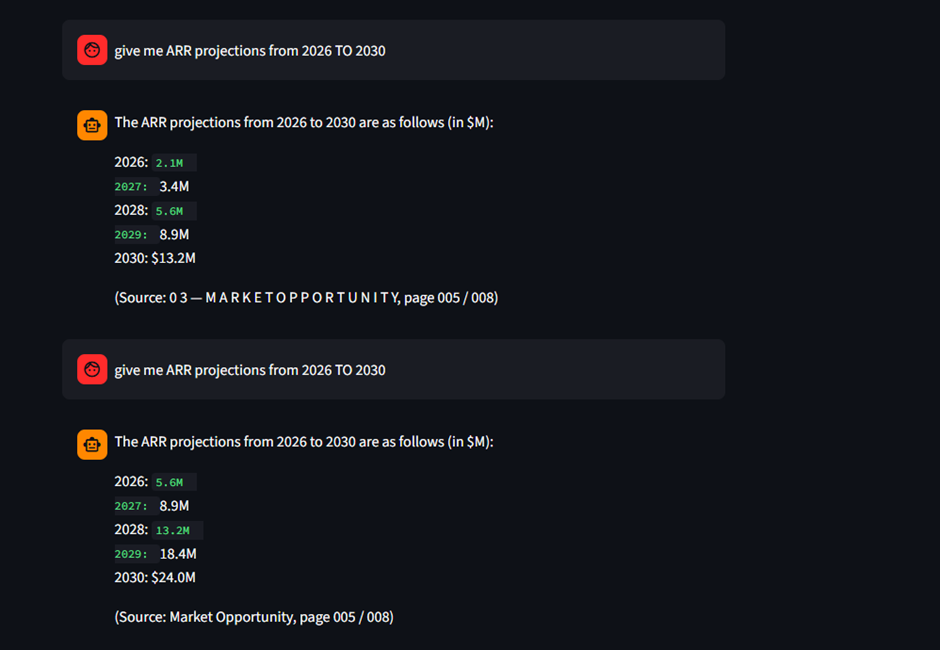
Questions like "What was the Q2 traction?" or "What is the ARR projection till 2030?" weren't answered reliably, even though the information existed in the PDF.
Initially, I thought the retrieval pipeline was failing. After inspecting the retrieved chunks, I realized the opposite—the hybrid search was retrieving the correct content.
The real issue was the document representation. The parser extracted the labels and numbers from charts, but the visual relationships between them were lost during text extraction and chunking. As a result, the LLM had the right data but not the context needed to interpret it correctly, leading to inaccurate answers.
That was when I realized that improving retrieval wasn't enough—I needed a way to preserve and retrieve the visual understanding of the document itself.
Figure 2a - Page from the PDF
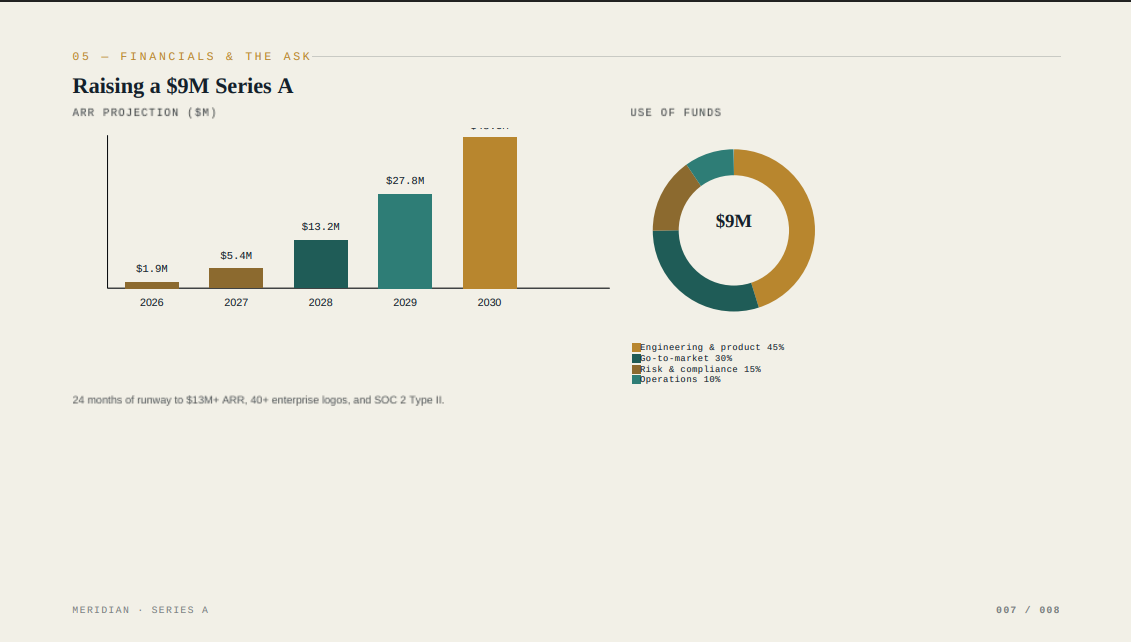
Figure 2b - Wrong answer from text-only RAG.
Finding the Right Approach
Once I realized that my text pipeline wasn't enough, I started exploring the world of Multimodal RAG. That's when I encountered a flood of new concepts—captioning models, CLIP, unified embedding spaces, multivector retrieval, ColPali, and ColQwen2. Every article seemed to recommend a different approach, making the decision far from straightforward.
Option 1: Captioning Every Page
The first idea was to generate a caption for every PDF page and index those captions alongside the document text.
Although simple, I quickly ruled it out. Captioning models summarize what an image is about, but they don't preserve the detailed information inside it. A caption like "A bar chart showing revenue growth" is unlikely to help retrieve the page for a query like "What is the ARR projection for 2028?" The quality of retrieval would depend entirely on how descriptive the generated caption was.
Option 2: CLIP
Next, I looked at CLIP, which embeds both text and images into a shared vector space. It seemed promising because it allowed text queries to retrieve images directly.
However, my use case involved dense document pages filled with charts, tables, and small text—not natural images. More importantly, CLIP represents an entire page using a single embedding vector, which felt insufficient for capturing all the information present in a complex document page.
That was when I came across the idea of multivector embeddings. Instead of representing a page with one vector, it could be represented by hundreds of vectors, preserving much richer information. This eventually led me to ColPali and ColQwen2, which became the foundation of my visual retrieval pipeline.
Building the Visual Pipeline
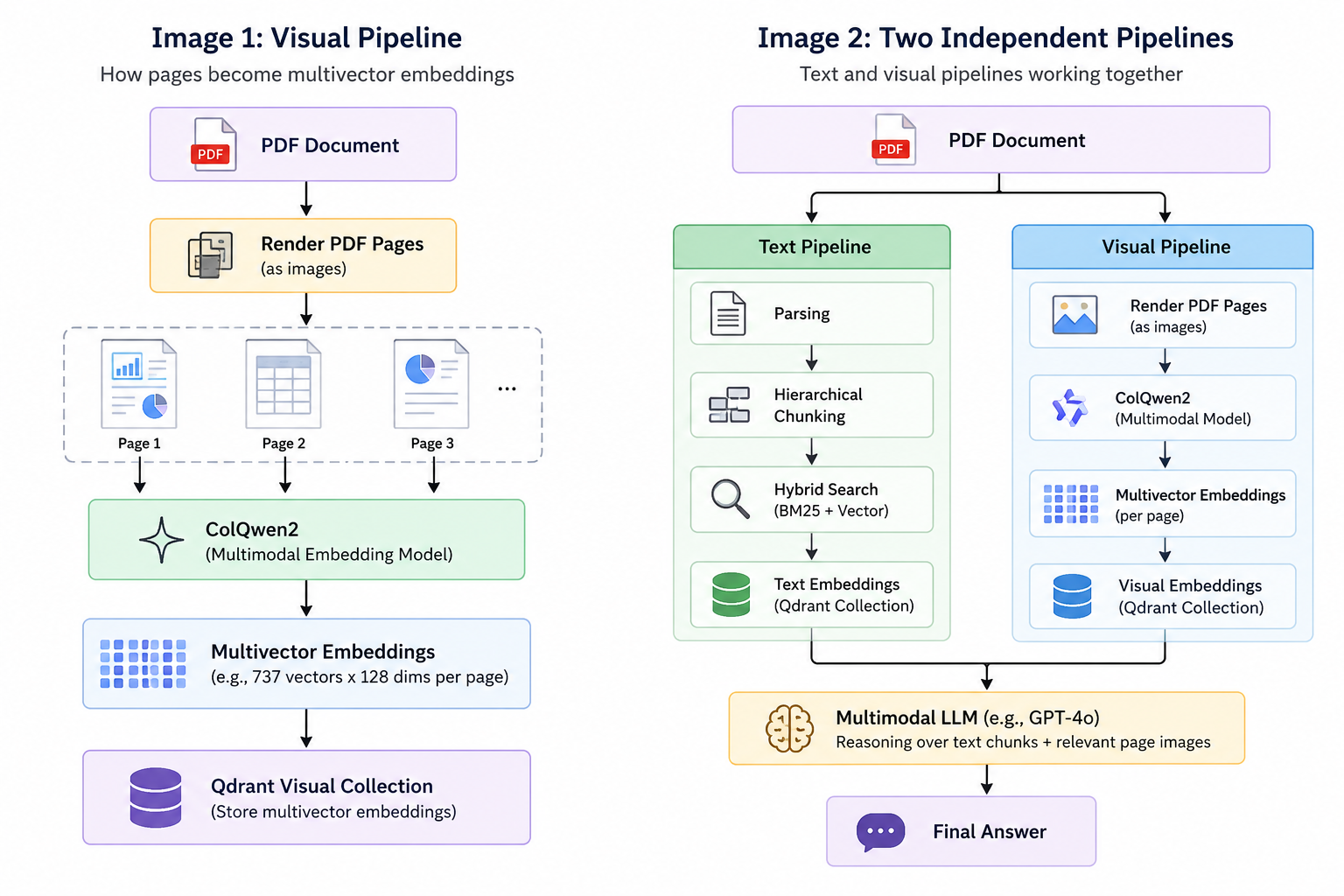
Once I understood why multivector embeddings were a better fit for document retrieval, I designed a separate visual pipeline instead of modifying my existing text pipeline.
The pipeline starts by rendering every page of the PDF as an image. Each page image is then passed to ColQwen2, which generates a multivector embedding representing the visual content of that page. These embeddings are stored in a dedicated Qdrant collection, completely independent of the text embeddings.
Keeping the text and visual pipelines separate turned out to be an important architectural decision. The text pipeline continues to excel at retrieving textual information using hierarchical chunking and hybrid search, while the visual pipeline specializes in retrieving pages whose meaning depends on charts, tables, diagrams, and other visual elements.
At query time, both pipelines work together—the text pipeline retrieves relevant text chunks, while the visual pipeline retrieves the most relevant document pages. These results are then passed to a multimodal LLM, allowing it to reason over both textual and visual context before generating the final answer.
Running the Visual Pipeline
Designing the visual pipeline was only half the challenge. The next hurdle was running ColQwen2, a relatively large model that wasn't practical to run on my local machine. Instead of forcing everything into a single application, I decided to separate model inference from the main application.
The pipeline begins by using PyMuPDF (fitz) to render every page of the PDF into an image. These page images are then sent to a FastAPI server hosting ColQwen2, which generates multivector embeddings for each page.
Since I didn't have access to a dedicated GPU locally, I deployed the FastAPI server on Google Colab and exposed it to my local application using ngrok. This allowed my application to generate embeddings through simple HTTP requests, while all the heavy computation happened remotely.
The generated multivector embeddings are then stored in Qdrant, where they can later be retrieved using query embeddings generated by the same model.
Separating the embedding service from the main application turned out to be one of the best architectural decisions of the project. It kept the application lightweight, made development possible without local GPU resources, and allowed me to replace or upgrade the embedding model in the future with minimal changes to the rest of the system.
Tech Stack
PyMuPDF (fitz) – Render PDF pages as images
ColQwen2 – Generate multivector embeddings
FastAPI – Expose the embedding model as an API
Google Colab – Free GPU for model inference
ngrok – Connect the local application to the Colab API
Qdrant – Store and retrieve multivector embeddings
OpenAI GPT-4o – Reason over retrieved text and page image
Retrieving Both Text and Visual Context
Once the ingestion pipeline was complete, the retrieval process became surprisingly simple.
Whenever a user asks a question, the query is sent to both the text pipeline and the visual pipeline simultaneously.
The text pipeline performs hybrid retrieval over hierarchically chunked content and returns the most relevant text passages. In parallel, the visual pipeline generates a query embedding using ColQwen2 and performs multivector search in Qdrant to retrieve the most relevant document pages.
These two sources of information are then combined and sent to GPT-4o.
This design turned out to be particularly effective because each pipeline specializes in what it understands best. The text pipeline excels at retrieving semantic information from paragraphs, while the visual pipeline retrieves pages whose meaning depends on charts, tables, diagrams, and layout.
An important design decision was that the visual pipeline does not return extracted text—it returns the original page image. This allows GPT-4o to reason directly over the visual content instead of relying on potentially incomplete text extraction.
For example, a query such as:
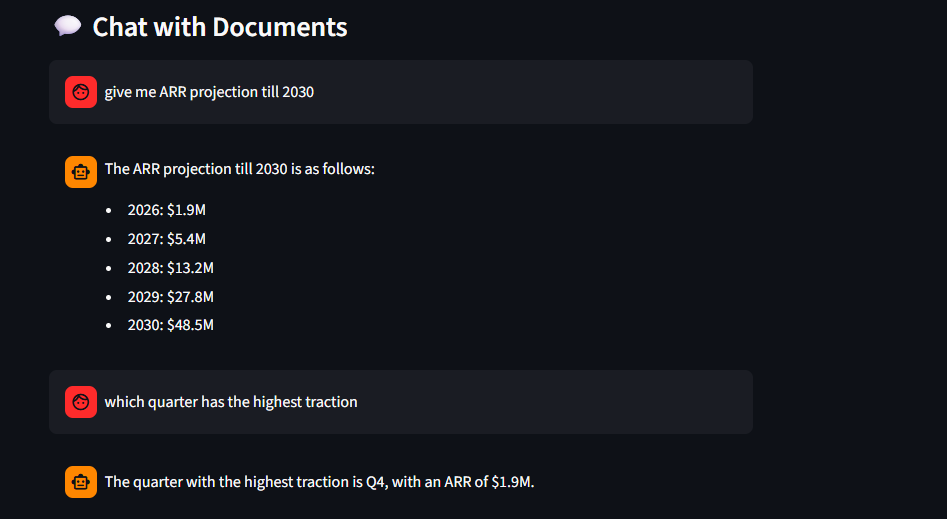
"What is the ARR projection till 2030?"
retrieves:
Text chunks describing financial projections.
The original page containing the ARR chart.
GPT-4o then combines both textual and visual context to generate the final answer.
Final Answer
Complete source Code
If you're interested in building a similar Multimodal RAG system or experimenting with multivector retrieval, I've open-sourced the complete implementation used in this article.
📂 GitHub Repository
The complete source code, including both the text and visual pipelines, is available here:
🔗 GitHub: <GitHub Repository Link>
📓 Google Colab Notebook
Since ColQwen2 requires a GPU, I also created a Google Colab notebook that hosts the model using FastAPI and exposes it through ngrok. You can use it directly or adapt it to your own setup.
🔗 Google Colab: <Colab Link>
Final Thoughts
Building this project completely changed how I think about RAG systems.
Initially, I believed that retrieval quality was the bottleneck. In reality, the bigger challenge was how the document was represented. A retriever can only search over the information it has been given, and if visual context is lost during preprocessing, no amount of retrieval optimization can recover it.
This project also reinforced another lesson: there is rarely a single "correct" architecture. Exploring captioning models, CLIP, and multivector retrieval helped me understand the trade-offs of each approach before arriving at a solution that fit my use case.
The current system already combines hybrid text retrieval with visual page retrieval to answer questions grounded in both text and images. There is still plenty of room for improvement—better reranking, golden dataset evaluation metrics, and optimized indexing are all on my roadmap—but this implementation provides a solid foundation for building document-aware Multimodal RAG systems.
If you found this article useful, I'd love to hear your thoughts or discuss different approaches to Multimodal RAG. Feel free to connect with me or open an issue on GitHub.