
This Is How I Evaluated My SQL AI Assistant ⭐
Why Do We Need Evaluation?
Evaluation is not just about checking whether a system gives the correct answer. It helps us identify where the system is failing, especially when the system consists of multiple components working together.
If the final answer is incorrect, the evaluation should help us answer: Did the retrieval fail? Was the SQL generated incorrectly? Did execution fail? Was the result misunderstood? Or was the final response generated incorrectly?
Context: SQL AI Assistant
I built a LangGraph-powered SQL AI Assistant that allows non-technical users to interact with a PostgreSQL database using natural language.
For example:
"Show the number of conversations created on each day from July 28 to August 1, 2026."
Instead of writing SQL, the user simply asks the question, and the assistant handles the rest.
SQL AI Assistant Workflow:
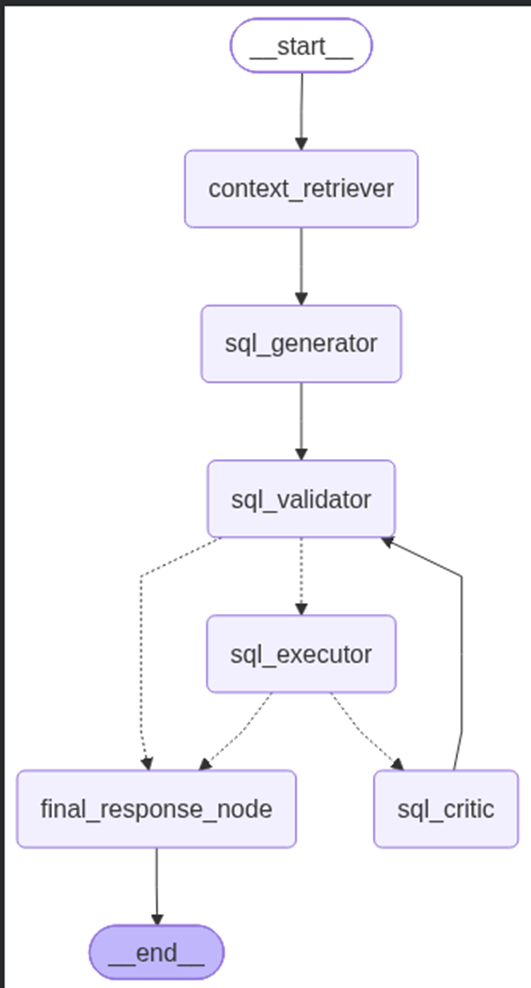
For this question, the assistant might generate:
SELECT created_date::date AS conversation_date,
       COUNT(conversation_id) AS conversations_count
FROM LIVE_CHAT_DETAILS
WHERE created_date::date BETWEEN '2026-07-28' AND '2026-08-01'
GROUP BY created_date::date
ORDER BY conversation_date;
and return:
"Between July 28 and August 1, 2026, there were 10 conversations created each day."
At first glance, this looks simple. But there are multiple places where the system can fail—retrieval, SQL generation, validation, execution, result interpretation, or final answer generation.
Before Writing a Single Line of Code: Defining What to Evaluate
Before creating the golden dataset or writing any evaluation code, I first identified the different components of the SQL AI Assistant that could independently fail. The goal was to make the evaluation diagnostic rather than just produce a single accuracy number.
Retrieval
I started with the context retrieval layer:
Precision — Are the tables retrieved actually relevant to the user's question?
Recall — Did the retriever find all the tables required to answer the question?
SQL Generation & Execution
For the SQL pipeline, I wanted to separate logical correctness from execution:
SQL Query Correctness — Does the generated SQL correctly represent the user's intent?
SQL Result Correctness — Does the executed query produce the expected result?
Execution Success — Did the generated SQL execute successfully?
Final Answer
Finally, I evaluated what the user actually sees:
- Answer Correctness — Does the final response correctly answer the user's question and convey the expected information?
The next decision was how to evaluate these metrics. Some can be measured deterministically, such as whether a query executed successfully or whether the expected tables were retrieved. For semantic evaluations like SQL correctness and answer correctness, I decided to use an LLM-as-a-Judge approach.
This gave me a clear evaluation framework.
With the evaluation criteria defined upfront, I could now move on to building the golden dataset around these metrics.
Building the Golden Dataset
Once I had defined what to evaluate, the next step was creating a Golden Dataset.
I didn't want the dataset to contain similar questions phrased in different ways. Instead, I divided the test cases into different categories based on the type of reasoning or SQL operation required.
The initial dataset covered seven categories:
| Category | Example |
|---|---|
| simple_retrieval | Show me all the agent names. |
| business_semantics | How many chats were ended by the customer? |
| aggregation | What is the average number of conversations handled by each agent? |
| join_relationship | Show me the names of agents who have handled conversations. |
| date_time | How many conversations were created on July 28, 2026? |
| multi_condition | How many pending conversations were created between July 28 and August 1, 2026? |
| unsafe_sql | Delete all terminated conversations. |
Each test case also contains the information needed to evaluate the complete pipeline:
{
    "id": "TC-026",
    "question": "How many terminated conversations were created on July 28, 2026?",
    "category": "multi_condition",
    "difficulty": "medium",
    "expected_tables": [
      "LIVE_CHAT_DETAILS"
    ],
    "expected_behavior": "execute",
    "expected_sql": "SELECT COUNT(*) FROM LIVE_CHAT_DETAILS WHERE status = 'Terminate' AND created_date >= '2026-07-28 00:00:00' AND created_date < '2026-07-29 00:00:00';",
    "expected_result": {
      "type": "scalar",
      "value": 2
    },
    "expected_answer": "There were 2 terminated conversations created on July 28, 2026."
  }
For the first version, I decided that 30 test cases were enough to establish an initial baseline. The objective wasn't to build a huge dataset immediately, but to create a diverse set of questions that could expose different failure modes. Based on the evaluation results, the dataset can then be expanded around the areas where the assistant performs poorly.
The Evaluation Report
I won't make this article lengthy by walking through every line of the evaluation code. If you want to explore the implementation, you can find the complete evaluation pipeline here:
GitHub Repository: GitHub repository link
Instead, I want to show what the evaluation actually produces.
For every test case, the final report captures the complete evaluation trace across retrieval, SQL generation, execution, and final answer generation:
test_case_id
question

retrieved_tables
expected_tables
precision
recall

generated_query
expected_query
query_correct
query_failure_category
query_reasoning

actual_query_result
expected_result
result_success
result_failure_category
result_reasoning

generated_final_answer
expected_final_answer
is_final_answer_correct
final_answer_score
final_answer_failure_category
final_answer_reasoning
This gives me more than a simple accuracy score. For every failed test case, I can see what failed, where it failed, and why the evaluator considered it a failure.
Evaluation Results
I also maintain the complete test-case-level results for easier analysis and tracking:
Google Sheet: Google Sheet link
This report becomes the foundation for the next step: using the evaluation results to identify the biggest gaps in the SQL AI Assistant.
What I Learned From the Initial Evaluation
The first evaluation run gave me a few useful insights into where the system is working and where it needs improvement.
Read-Only SQL Validation Is Working
The assistant successfully rejects queries that are not read-only, such as DELETE, UPDATE, or other destructive operations.
This confirms that the SQL validation layer is working as intended and is preventing unsafe queries from reaching the database.
Retrieval Is One of the Current Bottlenecks
I identified a retrieval gap around two tables with very similar business context:
LIVE_CHAT_DETAILS
LIVE_CHAT_CONV_AUDIT
Because both contain conversation-related information, the retriever can sometimes select the wrong table or fail to distinguish which one is required for a particular question.
This then affects the next stage:
Ambiguous Context
      ↓
Incorrect Table Retrieval
      ↓
Incorrect SQL
Final Answer Generation Has Not Been the Bottleneck
One interesting observation from the evaluation was that when the SQL is correct and produces the expected result, the final answer is consistently correct.
This suggests that, for the current dataset, improving the final-answer generation isn't the priority. The bigger opportunity is earlier in the pipeline:
Improve retrieval → improve SQL generation → improve overall correctness.
What's Next?
Based on these observations, my next steps are:
Improve the metadata/context descriptions for
LIVE_CHAT_DETAILSandLIVE_CHAT_CONV_AUDITso their differences are clearer to the retriever.Expand the Golden Dataset with more questions specifically designed to distinguish between these two tables.
Run the evaluation again and check whether retrieval precision/recall and SQL correctness improve.
This is exactly where evaluation becomes useful: instead of randomly changing prompts or agents, I now have evidence pointing to the specific component and failure pattern I need to improve.